![GO-Logo Medium-3.png]](https://knowledgebase.gooverseas.com/hs-fs/hubfs/GO-Logo%20Medium-3.png?height=40&name=GO-Logo%20Medium-3.png)
Your Go Overseas FAQs are short, ready-made answers to the questions travelers ask most, built automatically from the information on your provider profile and program listings, so travelers and AI search tools get accurate answers about your programs.
In short: To change an FAQ answer, update the profile or program field it comes from and save. The FAQ refreshes on its own. Professional plans and above can also edit standard answers directly, and Strategic and Enterprise plans can add custom FAQs.
Why FAQs help your programs
- Faster decisions: travelers get key answers (cost, length, location, housing) without leaving your listing.
- AI search visibility: every FAQ is marked up so Google and AI assistants like ChatGPT, Perplexity and Gemini can read and cite your program details.
- Trust: answers come from your own listing data and verified Go Overseas reviews.
How your FAQs are built
Each FAQ question is linked to one or more fields on your profile or program listing. When a field has information, the question appears. When it is empty, the question stays hidden, so travelers never see a blank or half-finished answer.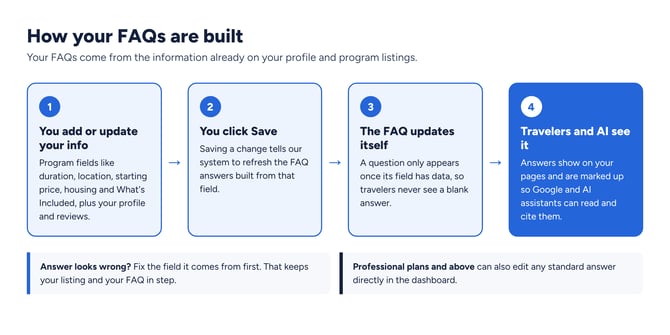
Your FAQs update themselves when you update the fields they come from.
Which fields create each FAQ answer
Program page FAQs
| FAQ question | Where the answer comes from | Good to know |
|---|---|---|
| How long is [program]? | Duration field on the program listing | Uses the duration exactly as selected |
| Where is [program] located? | Program locations (cities and countries) and Training Type | If you offer online and in-person options, tick both Online and Classroom under Training Type |
| How much does [program] cost? | Starting price on the program listing | Only shows if the price was updated in the last two years |
| What's included in [program]'s fee? | What's Included checkboxes | Tick only one of each pair, for example Meals or Some Meals |
| What are the age requirements? | Minimum and maximum age fields | A minimum age alone works too |
| Is housing provided? | Housing field and housing types | Hidden for online-only programs |
| How do I apply? | Apply Now link on the program listing | Available on paid plans |
Provider profile FAQs
| FAQ question | Where the answer comes from | Good to know |
|---|---|---|
| Is [provider] reputable? | Your verified Go Overseas reviews | Appears once you have 15 published reviews |
| What countries does [provider] offer programs in? | Locations across your program listings | Expire listings you no longer run so their countries drop off |
| Does [provider] offer scholarships or financial aid? | Funding information on your listings | Add scholarships, aid or payment plans you offer |
| What kind of support does [provider] offer during programs? | Support fields on Edit Provider Profile: Health and Safety, Funding, BIPOC, LGBTQIA+, Neurodivergent and Accessibility support | Each field is summarized into a short line, so clear, specific wording works best |
Where to find your FAQs
In your Provider Dashboard, open the menu and select FAQs (under Content Management). Use the Provider and Program tabs to see each question and its status.
- Published: the FAQ is live on your page.
- Needs input: the field behind it is empty. Use the link next to the question to jump to that field.
- Locked: the feature is part of a higher plan.
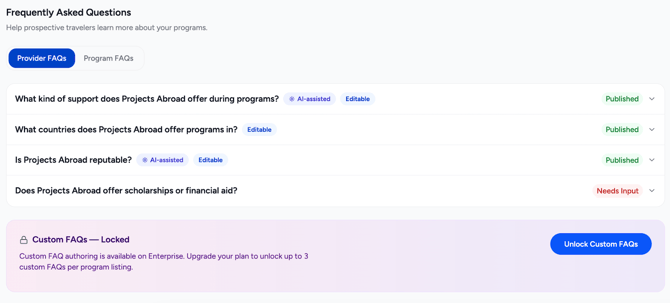
The FAQs tab shows every question, its status and where to add missing info.
How to update or correct an FAQ answer
- Find the source field: use the tables above, or the link next to the question in your FAQs tab.
- Update the field: edit your program listing or Edit Provider Profile.
- Save: the FAQ refreshes automatically once you save. Refresh the page to see it.
- Check the live page: open your program or profile page and confirm the new answer.
- Still not right? Professional plans and above can edit the answer in the FAQs tab. On other plans, contact our team and we will review it.
Tip: Fix the source field first, even if you can edit answers. That keeps your listing, your filters and your FAQ telling the same story.
FAQ features by plan
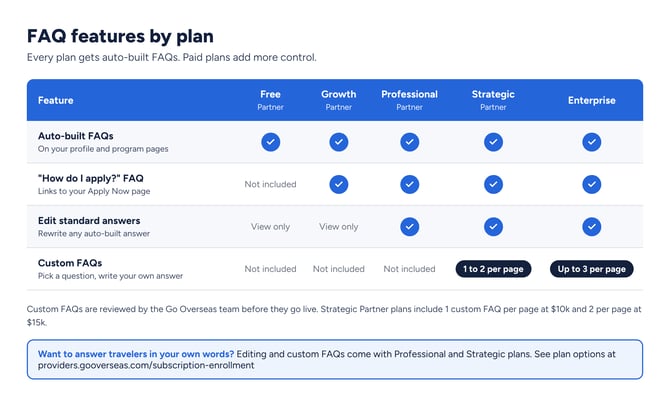
Every plan gets auto-built FAQs. Paid plans add more control.
| Plan | What you get |
|---|---|
| Free Partner | Auto-built FAQs, view only |
| Growth Partner | Auto-built FAQs for AI search visibility, including "How do I apply?", view only |
| Professional Partner | Edit every standard provider and program FAQ answer |
| Strategic Partner | Editing, plus 1 or 2 custom FAQs per page depending on your plan |
| Enterprise | Editing, plus up to 3 custom FAQs per page |
Want to answer travelers in your own words? Custom FAQs let you choose a question from our question bank, such as "What does a typical week look like?", and write the answer yourself. Our team reviews each one before it goes live. Explore plans with editable and custom FAQs.
Frequently asked questions
Can I edit my FAQs directly?
On Professional plans and above, yes: open the FAQs tab and edit any standard answer. On Free and Growth plans, FAQs update when you update the fields they come from.
If I update my listing, will my FAQs update automatically?
Yes. Saving a change to a source field refreshes the FAQs built from it. Refresh your page to see the new answer.
Why is a question missing from my page?
The field behind it is empty, or the cost was last updated more than two years ago. Look for the Needs input status in your FAQs tab and follow the link to add the info.
My listing is correct, but an FAQ answer is not. What should I do?
Contact our team with the page link and the question. We will review it and correct the answer. Professional plans and above can also edit the answer right away.
Can I remove an FAQ?
An FAQ hides automatically when its source field is empty. If a field needs to stay on your listing but the answer is not right for travelers, contact us and we will review it.
Do FAQs help with AI search?
Yes. Every FAQ is marked up so Google and AI assistants can read it, which helps your program details show up accurately in AI answers. Learn more in Index Status and SEO Best Practices.
What are custom FAQs?
Questions you pick from our question bank and answer in your own words, available on Strategic and Enterprise plans. Our team reviews each answer before it publishes.