![GO-Logo Medium-3.png]](https://knowledgebase.gooverseas.com/hs-fs/hubfs/GO-Logo%20Medium-3.png?height=40&name=GO-Logo%20Medium-3.png)
Most applicants start researching within six months of applying, and plenty take longer. In that window they read reviews, ask an AI for recommendations, compare programs and weigh up your reputation.
Link tracking is how you start measuring that window. A short tag on your links labels where each visit came from, so you can see which parts of the journey are moving people toward an application. Setup takes only ten minutes.
Why it matters
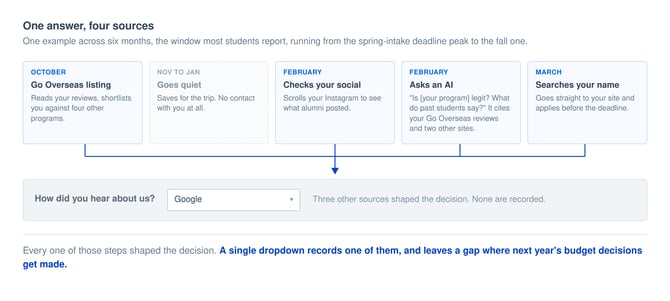
A student may find you on Go Overseas in October, then goes quiet for three months. In February they scroll your Instagram, then asks an AI whether your program is reputable with an answer citing your Go Overseas reviews and two other sites. In March they search your program and applies before the deadline.
Your form asks how they heard about you. They pick one answer, which cites one source for a decision that took four, and leaves a gap where next year's budget decisions get made.
How to Build a UTM link
- Open the GA4 Campaign URL Builder: https://ga-dev-tools.google/ga4/campaign-url-builder/
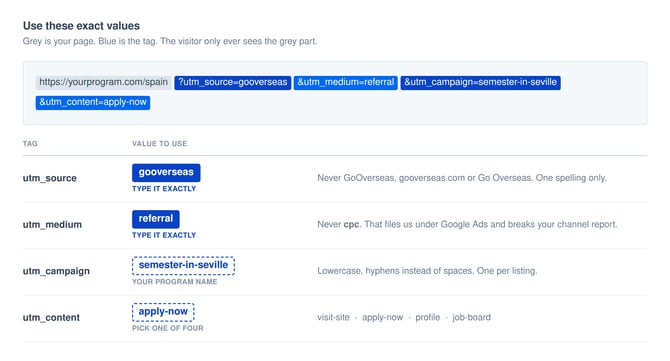
- Enter your program page URL, then the following parameters:
- Source: gooverseas
- Medium: referral
- Campaign: your program name, lowercase with hyphens. Example: semester-in-seville
- Content: which link. Use visit-site, apply-now, profile or job-board
- Copy the URL at the bottom of the page into your listing.
See the results in GA4
Test to confirm the tag works the day after created. Then
- Open one of your tagged links in a private browser window and let the page load.
- In GA4, go to Reports > Realtime.
- Look for a user with source gooverseas and medium referral.
If your Key events column is empty, nothing is set up yet. Mark your inquiry form, application, and payment thank-you page as a key event in GA4 and the column fills from that point on. Without it you can measure interest but not outcomes.
Reporting: see what it delivered
At your reporting cadence, pull the results:
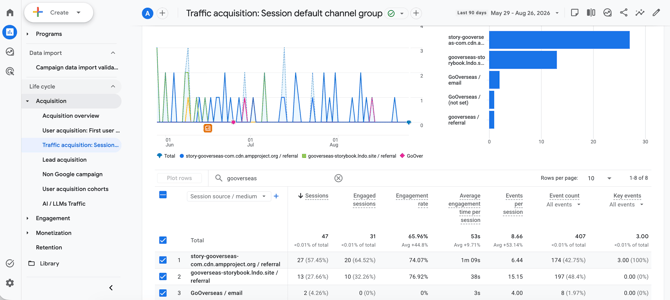
- Go to Reports > Acquisition > Traffic acquisition.
- Set the date range, top right, to Last 90 days. The research window is longer than the default 30 days.
- Change the first column from Session default channel group to Session source / medium.
- Find the row gooverseas / referral. That is all of your Go Overseas traffic.
- Click the + beside the column heading and add Session campaign for one row per listing.
🧠 One limitation to know about. GA4 only looks back a set number of days when it decides which source gets credit for a conversion, and that window is shorter than a six-month research journey. Check your attribution lookback setting in Admin and extend it as far as GA4 allows, and capture the source into your CRM at the inquiry stage so the record survives regardless of what GA4 keeps.
Turn guesswork to data-backed decisions with UTMs.
Need help through the setup? Consider us an extension of you marketing team, email your Client Success Manager. We're happy to help!