![GO-Logo Medium-3.png]](https://knowledgebase.gooverseas.com/hs-fs/hubfs/GO-Logo%20Medium-3.png?height=40&name=GO-Logo%20Medium-3.png)
Your Content Health Score shows how well your Go Overseas listings are set up to be found in Go Overseas search and AI search. Each live program also has its own Program Health bar. Click any bar to see exactly what to do next.
In short: Fresh reviews, interviews and complete, up-to-date listings raise your score. Every fix is listed for you in the dashboard, with the boost it gives.
Where to find your scores
Log in to your provider dashboard and open Content Management. You'll see two scores that work together: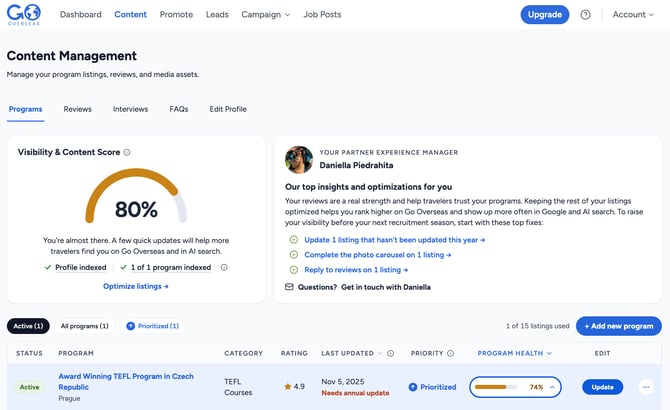 Your Content Health Score (top) and the Program Health bar for each live program (in the table).
| Content Health Score | Program Health | |
|---|---|---|
| Where | The gauge at the top of Content Management | The bar on each row of the Program Listings table |
| What it shows | How optimized your profile is overall | How optimized one program listing is |
| What drives it | The health of your live programs, plus your provider FAQs and active campaign | Reviews, interviews and listing content |
How to read your Content Health Score
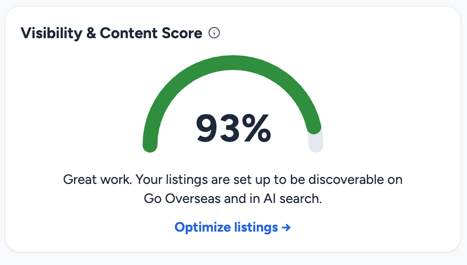 Every listing fix supports improving your score and discoverability.
| Band | What it means | Your next step |
|---|---|---|
| 85 to 100% | Your listings are set up to perform well | Keep reviews and content current |
| 60 to 84% | A strong foundation, with a few quick wins left | Open each Program Health bar and work through the top fixes |
| 0 to 59% | Plenty of room to grow, and every fix counts | Start with reviews and a content refresh |
What makes a program healthy
Program Health comes from two areas: what past participants say about you, and how complete and current your listing is.
Reputation (about 55% of Program Health)
| Factor | Why it helps | Impact |
|---|---|---|
| Reviews | Travelers trust real experiences. More reviews with strong ratings build confidence. | ●●●●● |
| Recent reviews | A review in the last 90 days shows your program is active and current. | ●●● |
| Alumni interviews | Long-form stories help travelers picture themselves on your program. | ●● |
| Replying to reviews | Shows travelers you're engaged and responsive. | ● |
Content (about 45% of Program Health)
| Factor | Why it helps | Impact |
|---|---|---|
| Fresh content | Listings updated in the last 12 months signal accurate information. | ●●●● |
| Program highlights | Gives travelers the "why this program" at a glance. | ●●● |
| Full photo carousel (5+ photos) | Visuals drive clicks and inquiries. | ●● |
| Video | Brings the experience to life. | ● |
| Working links | Keeps travelers moving to your website without dead ends. | ● |
| Program FAQs | Answers the questions travelers, and AI assistants, are asking. | ● |
Your biggest unlocks
A few factors carry extra weight. Fixing any of these usually gives your score its largest jump:
- Get your first reviews. Programs with no reviews stay in Low visibility. See 7 Ways to Get Reviews on Go Overseas.
- Refresh your program page. Update any listing that hasn't been edited in the last 12 months. See Adding and Optimizing a Program Listing.
- Collect a new review. If your last review is over a year old, a fresh one opens the top band. See How to Ask Your Alumni for Reviews.
- Fix broken links. A single broken link keeps a program below Optimized.
How to raise your score in 5 steps
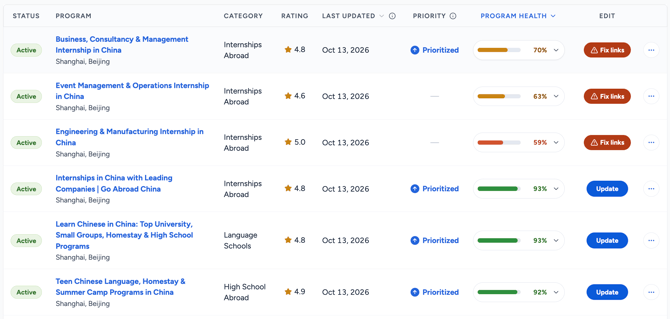
Each live program has its own Program Health bar. Click it to open the checklist.
- Go to Content Management, then Program Listings.
- Click any Program Health bar to open its checklist.
- Look for the green "+%" chips. Each one shows how much that fix adds.
- Click a fix to go straight to the right place to make it.
- Watch your score update. Changes count when you save, and scores also refresh every night.
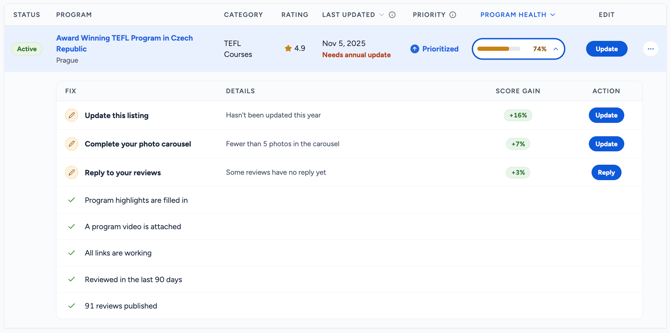 The checklist shows what's already done and which fixes give the biggest boost.
Tip: Start with the programs you care about most, such as your priority listings. That's where your effort shows up fastest.
Frequently asked questions
What is the Content Health Score?
The Content Health Score is a percentage in your Go Overseas provider dashboard that shows how well your program listings are set up for visibility in Go Overseas search and AI search. It combines the Program Health of your live programs with your provider FAQs and active campaign.
What is Program Health?
Program Health is a bar on each live program in your Program Listings table. It reflects that one listing's reviews, interviews and content. Click it to see the fixes that would raise it.
Does my score change my ranking on Go Overseas?
Not directly. Your score is built from the same signals Go Overseas search and AI search look for, so improving your score means improving those signals. Learn more in How does the Go Overseas Algorithm work?
Which programs count toward my score?
Only live (Active) programs. Paused and Expired listings don't affect your score. See Program Listings: Adding, Editing, Pausing, and Expiring.
I just added a new program. Does it count?
Yes, right away. Add reviews and complete content early so it lifts your score. See What to do if you are a New Program.
Why did my score change?
Most often because a review aged past 90 days or one year, a link broke, or a new program was added. If you see a "high demand" alert at the top of your dashboard, contact Partner Success.
How often does my score update?
When you save changes to a listing, and every night.